

Google will remove certain search results about you for free. It does not remove news articles, court records, or reviews. Its Results About You tool covers your personal phone number, home address, email address, and government ID numbers, and Google's related policies cover bank details, medical records, login credentials, intimate images, and some doxxing content.
What the tool does not touch is news coverage. A news article usually calls for a different route, and knowing exactly where Google’s tools stop makes it easier to choose the right one.
Key Takeaways
- The tool is free and quick. A single request takes about ten minutes to file once you have the URL.
- It covers a specific list of data. Personal contact details, government ID numbers, and some intimate images qualify.
- It removes the result, not the page. An approved request takes the URL out of Google Search. The page stays live on the website.
- It does not cover everything that hurts. News coverage, court records, honest reviews, and unflattering opinion fall outside the policy.
- Bing needs a separate request. Nothing filed with Google carries over to Bing or the search products it powers.
What Does Google Results About You Do?
Results About You is a free Google tool that finds search results showing your personal contact details or ID numbers and lets you request their removal. When Google approves a request, it removes that URL from Google Search. It does not delete the web page, which stays live on the site that published it.
The distinction between a search result and a web page causes most of the disappointment people have with this tool. A web page lives on someone else's server, and only that site's owner can change or delete it. A search result is Google's pointer to that page. Results About You controls only the pointer, so the most it can do is deindex a page from Google. It cannot erase anything.
Removing the pointer still does a lot, since most people find information by searching a name. But the direct link still works, other search engines may still list the page, and the site can republish the details at a new address.
Why Does Your Personal Information Appear on Google?
Google usually does not create the page showing your personal information. It indexes information that was already published somewhere else. The most common sources include:
- People search and data broker sites that compile records into a profile under your name.
- Public records, such as voter files, property records, and some licensing databases.
- Business directories that list a home based business at your residence.
- Old profiles and accounts on forums, social platforms, or services you stopped using.
- Other publicly accessible pages, such as event listings, newsletters, and uploaded documents.
The same address or phone number can appear in several results because data brokers copy, buy, and license each other's records. One source record can feed dozens of listings. That is why identifying where the information originated matters before you start filing requests.
What Can Results About You Remove From Google?
The table below reflects Google's current personal content policies. Some items go through the Results About You dashboard and others through Google's broader removal form.
| Qualifies for Removal | Does not Qualify |
|---|---|
| Personal phone number | News articles |
| Home address, including past addresses | Court and arrest records |
| Personal email address | Business information |
| Government ID numbers (Social Security, passport, driver's license) | Reviews |
| Bank account and credit card numbers | Opinion and commentary |
| Medical records | Anything you published yourself |
| Confidential login credentials | |
| Nonconsensual intimate images | |
| Some doxxing content |
Source: Google Search Help, Remove my private info from Google Search
Borderline cases generally follow a recognizable pattern. Professional contact details are excluded unless they were posted to harm you, in which case the detailed removal form applies.
Google also declines contact information on government, educational, and newspaper websites because it treats those sources as valuable to the public. When a page mixes your details with information of public value, Google may approve a narrower removal so the page stops appearing only for searches that include your name.
How Do You File a Results About You Request?
Steps verified against Google's interface on September 29, 2026. Menu labels may change slightly over time.
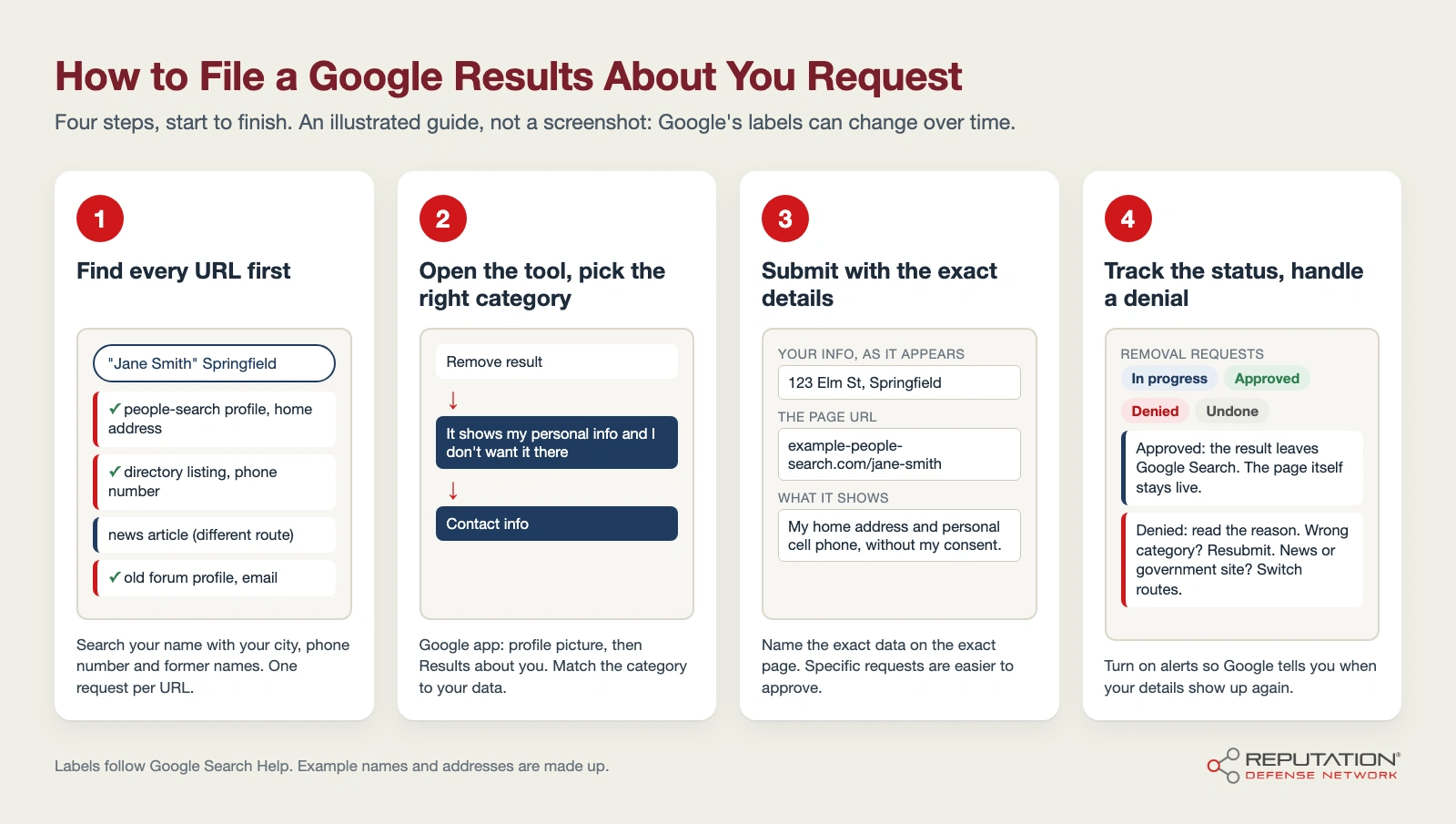
1. Find Every URL First
Action: Build a complete list of URLs before you file anything. Each URL is a separate request, and a partial list leaves results behind that you will have to find later. Search your name in quotes, then combine it with your city, phone number, and former names. Add site searches for known brokers, such as site:whitepages.com "Jane Smith" or site:spokeo.com "Jane Smith".
2. Open the Tool and Pick the Right Category
Action: Open Results About You and match the request to the correct category. In the Google app, tap your profile picture and choose Results About You. On desktop, open it from your Google Account. From a search result, open the three dot menu, choose Remove result, then It shows my personal info and I don't want it there, then Contact info.
For data the dashboard does not handle, Google's removal form currently lists the categories:
- personally identifiable info and doxxing content
- personal sexual content
- content related to individuals under 18
- content on sites with exploitative removal practices.
A mismatched category is one of the most common reasons requests fail.
3. Submit the Request With Documentation
Action: Name the exact data on the exact page. Enter your details exactly as they appear on the result, including an old address or a nickname. Form requests also ask for screenshots, which help Google locate the content. Skip unrelated documents and arguments regarding fairness.
A good one line description reads as follows: "This page displays my current home address and personal cell phone number without my consent." Specific requests succeed more often than general complaints.
4. Track the Status and Handle a Rejection
Action: Check Removal requests in the dashboard and read any denial reason. Each request shows as in progress, approved, denied, or undone. An approval usually removes the URL for every search, though some become name based removals.
A rejection for the wrong category is fixable, so resubmit under the right one. A rejection because the source is a news, government, or educational site is not. If the same request is denied twice on the same grounds, stop resubmitting and switch to a different route.
How Do You Remove Personal Information From the Website Itself?
Removing a Google result does not erase the information from the internet, so source removal is the stronger long term fix when it is available. The basic sequence includes:
- Identify the site hosting the information. Note the exact page URL.
- Find its removal process. Look for a privacy page, opt out form, deletion request, or contact address.
- Submit only what the site needs. Provide the minimum identifying information required to locate your record.
- Document the request. Save confirmation emails and screenshots with dates.
- Verify the result. Check the page again after the stated processing time.
Data broker and people search sites usually run standardized opt out forms. Blogs, forums, and publishers are different: you contact the webmaster or editor directly, and an edit or deletion is usually a request instead of an obligation. Removal rights vary by site, jurisdiction, and type of information, so not every site will agree.
Once a source page changes or disappears, Google may still show the old snippet for a while. At that point, Google’s Outdated Content tool can refresh the result.
What Other Google Removal Tools Can You Use?
Readers routinely file the wrong Google content removal request and wait weeks for nothing. This comparison shows what each tool is for.
| Tool | Use it for | Key condition |
|---|---|---|
| Results About You | Contact details and ID numbers in results. | The data must be yours and not on a site you control. |
| Outdated Content tool | Stale results after a page changed or was removed. | The source page must already have changed. |
| Legal removal requests | Defamation, copyright, and other legal claims. | Legal documentation, ideally a court order. |
| Personal information removal policy | Doxxing and sites with pay for removal practices. | The page must meet a specific policy test. |
The Outdated Content Tool
The Google outdated content removal tool works under the one condition that seldom gets explained as the page must already have changed or been taken down. It refreshes Google's stored view of a page so results match what is live now. It does not remove content that is still published, so file it only after the source removal succeeds.
Legal Removal Requests
Google's Legal Help Center handles claims such as defamation and copyright. Copyright requests need proof that you own the work and the location of the infringing copy. Defamation requests need the specific statements and why they are false, and a court order carries far more weight than your own assertion. Our legal network can advise on whether a legal route is realistic.
The Personal Information Removal Policy
The personal information removal policy surpasses Results About You and covers doxxing, meaning your details posted with threats or aggregated without a legitimate purpose, and it covers sites with exploitative removal practices, including those that charge a fee to take content down. It is the policy that helps most with mugshot sites. See our guide to removing mugshots from Google for that process.
How Do You Remove Personal Information From Bing?
Bing runs its own index, its own removal tools, and its own timeline. Its results also power Microsoft Copilot, and DuckDuckGo draws heavily on Bing's index, so a result removed from Google may still appear in all three places. A reader who files only with Google is half done.
Use the Bing Content Removal Tool for pages deleted or changed at the source, and Bing's Report a Concern form for personal information on live pages.
What Will Google Not Remove From Search Results?
Google will not deindex accurate news coverage, live court records, honest reviews, or opinion, because it treats newsworthiness and public interest as reasons to keep them searchable. Each of these has a different route:
- News articles: publisher outreach asking for an update, anonymization, or removal. See our news article removal hub.
- Court and arrest records: sealing or expungement where eligible, then correction requests to the sites republishing them. See how to remove court and arrest records from Google.
- Reviews: takedown requests when a review breaks the platform's own content policy, and a considered response when it does not.
- Opinion and anything else that stays live: suppression, which builds accurate results that outrank it. See search control.
Can Results About You Alert You to New Results?
Results About You can check Google on an ongoing basis and alert you by email or in the Google app when a new result shows your details. Turn it on and add every version of your information, including former names and past addresses. The limit is scope. It watches only for contact details and ID numbers, and only in Google.
Removed listings reappear because brokers refresh their data and republish it at new URLs. Broader reputation monitoring watches your name across search engines, news, reviews, and broker sites, so a returning listing is caught early.
What If Google Rejects Your Removal Request?
The free tools handle a few qualifying listings well. They struggle in three situations:
- A news article ranks for your name.
- A listing is copied across dozens of broker sites.
- A request was rejected on newsworthiness or public interest grounds.
A client came to us after a Results About You request removed their home address from one search result, only to find the same address on several other sites a few weeks later. The original listing came from a data broker that sold its records to people search sites.
In a scenario like this, the Google result is only the visible part of the problem. A review of the situation found:
- People-search profiles on several broker sites showed the same address and phone number.
- An old business directory listing tied to a home based business.
- A local news article that mentioned the person’s street.
- Bing results that still showed listings Google already removed.
In every case, we begin at the source where removal is possible. In this instance:
- Each broker site received an opt out request using the exact profile URL.
- The directory received a request to remove or update the home address.
- The publisher received a request to remove the street detail, since Google will not deindex news coverage.
- Once each source page changed, Google and Bing each received their own refresh requests.
Results About You alerts and broader monitoring continued to watch for listings that returned after brokers refreshed their data.
Reputation Defense Network runs policy, publisher, legal, and suppression routes together as opposed to one at a time. We have no special access to Google and use the same public processes described here, with the documentation and follow through that makes them work. Learn more about tactical removal.
Frequently Asked Questions
How do I get rid of unwanted Google search results?
Use three routes in order. File a free Google request for personal contact details, ID numbers, and other information Google’s policies cover. Contact the publisher or site owner for everything else. If neither works, suppression can push the result lower with accurate content. Most people who want to remove information from Google need more than one of these routes.
Is Results About You free?
Yes, free. The real cost is time, since each URL needs its own request and a full cleanup can involve dozens. Nobody needs to pay a firm to file a single request.
How long does a Google removal request take?
Expect two separate delays. Google's review typically takes a few days, and approval is followed by a short wait before the result leaves Search. Outdated content refreshes depend on Google recrawling the page. Complex requests can take several weeks. See our removal timeline guide for detail.
Does Results About You remove news articles?
No. Google treats news coverage as information valuable to the public, so newspaper pages are excluded from Results About You even when they show personal details. The realistic routes are publisher outreach or suppression, covered in our news article removal hub.
Does removing a result delete the web page?
No. The page stays live, so anyone with the direct link can still open it. Bing and the search products it powers may also keep listing it until you file there separately.
Can a removed result come back?
Yes. It can return if the page changes, if the site republishes the information at a new URL, or if a request is undone or revisited under a policy review. Results About You monitoring flags new matches for your contact details. Broader reputation monitoring catches the rest.
Can I make my name unsearchable on Google?
Not completely in most cases. Google can remove eligible personal information results, but other lawful pages about you may stay indexed. You can reduce exposure by removing data at the source, filing eligible requests, tightening privacy settings on your accounts, and addressing individual results. No single setting makes a name disappear.
Need Help With What Google Will Not Remove?
If the free tool rejected your request or the result you care about never qualified, there is usually still a route. Request a consultation and we will show you which one fits.
This article is general information and not legal advice. Google changes its tools and policies, so confirm current requirements on Google's help pages before filing.

RDN is dedicated to helping businesses of all size make informed decisions. We adhere to strict editorial guidelines our content meets and maintains our high standards.
Prefer RDN in your Google results? Add us as a preferred source on Google.
Related Articles
How to Remove a Mugshot From Google: 7 Proven Steps
Published on November 18, 2026
By Scott Bates You can usually remove a mugshot from...
Google Results About You: What It Removes, What It Misses
Published on November 18, 2026
By Scott Bates Google will remove certain search results about...
How to Remove Court and Arrest Records From the Internet and Google
Published on November 18, 2026
To remove court records from the internet, seal or expunge...